
Overview
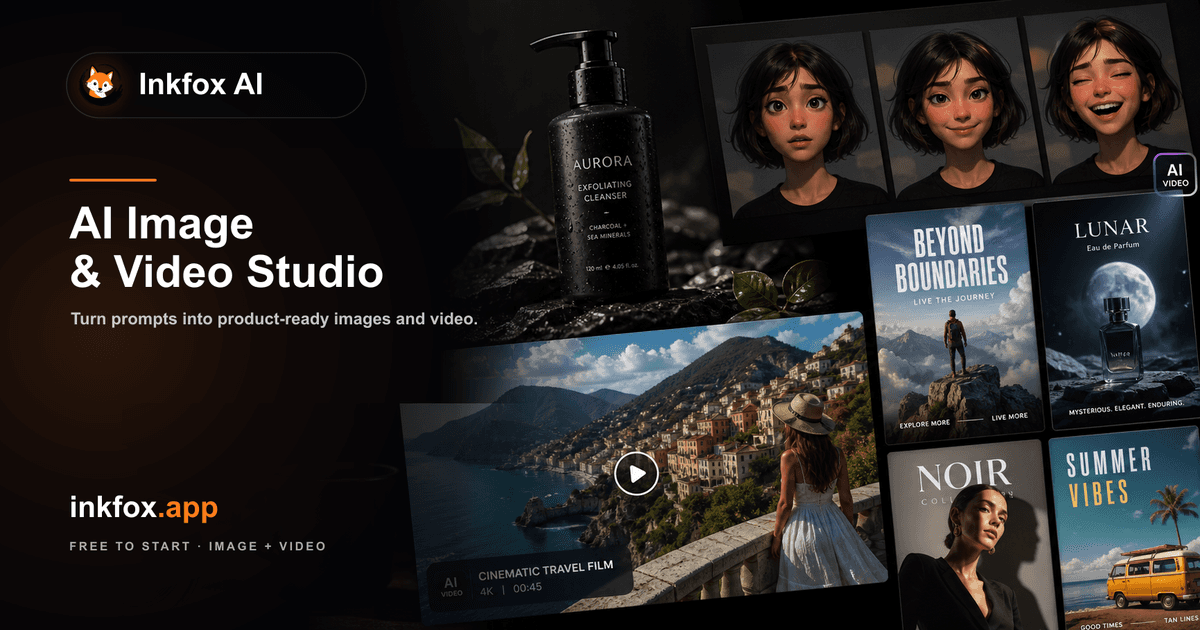
Inkfox AI gives you text-to-image generation across multiple models — Nano Banana 2.0, GPT Image 2.0, Flux, and Seedream — without requiring an account or a credit card. You open the site, type a prompt, and get images. The multi-model setup means you can switch between outputs and pick what actually works for your use case rather than being locked into one provider's aesthetic. Beyond generation, you get a small suite of editing tools in the same place: background removal and replacement, AI upscaling to print-ready resolution, and inpainting for removing or modifying objects within an image. These are the tasks that normally require juggling three or four separate tools. The free-and-no-signup positioning is the main draw. There are no usage tiers to decode, no trial limits counting down, and no email confirmation standing between you and a result. Whether that holds as the service scales is worth watching, but right now it's a low-friction option for anyone who needs image generation without a subscription commitment.
- Generate images from text prompts using four distinct models: Nano Banana 2.0, GPT Image 2.0, Flux, and Seedream
- Remove backgrounds from images in one click, then replace them with generated or custom scenes
- Upscale outputs to high or print resolution without leaving the tool
- Inpaint specific regions to remove objects or fill in areas with new content
- Switch between models on the same prompt to compare outputs before committing
- Access everything without creating an account or providing payment details
What stands out
- No sign-up and no payment required — genuinely zero friction to start
- Multiple models in one interface reduces the need to maintain accounts across different services
- Editing tools (background removal, upscaling, inpainting) are bundled rather than siloed
- Free tier with no visible usage cap is rare and practically useful for low-volume work
Where it falls short
- No account means no saved history — your generations are gone when you close the tab
- Sustainability of unlimited free access is unclear; terms or limits could change without much notice
- No API access, so it's not useful for automated or programmatic workflows
- Model quality and output consistency haven't been independently benchmarked against paid alternatives
Who it's for
- Designers who need quick concept visuals without spinning up a paid Midjourney subscription
- Developers prototyping UI mockups or placeholder assets and don't want to manage API keys
- Small business owners who need one-off product images or marketing visuals without a monthly tool budget
- Content creators who want background removal and upscaling in one place rather than across multiple free tiers
- Hobbyists experimenting with AI image generation who aren't ready to commit to any paid platform
Pricing
What we hold on record for Inkfox AI.
- Pricing model
- Free Tool
Advertised prices often assume annual billing — The Annual-Billing Illusion , our study of 150 tools.
Our take
Canva's image tab, minus the paywall
— Toolhunter editors
Frequently asked questions
Is Inkfox AI free?
Yes — Inkfox AI is free to use.
How much does Inkfox AI cost?
Nothing — it's completely free.
What is Inkfox AI used for?
Canva's image tab, minus the paywall. It's listed under Design in our directory.
What are the best Inkfox AI alternatives?
The closest matches in our directory are Home Design AI, Book Cover Generator, ogimagegenerator.dev and SketchVideo AI — see "More tools like this" below for the full set.
Keep comparing
Reviews
No reviews yet
Be the first to share your experience.
More tools like this
All Design tools →Looking for AI tools similar to Inkfox AI? These are the closest picks in our index.

AI-powered home design tool for interiors, exteriors, and floor plans. Upload a photo and get realistic redesign renders in seconds.

AI book cover generator for indie authors: turn your title, genre and story summary into two distinct cover directions, then refine and download.
Paste a URL and AI reads your page, picks up your brand colours, fonts and logo, and designs Open Graph images that fit it. Edit everything, export a PNG or get a hosted og:image link. Free, no account.
Animate a Drawing AI turns hand-drawn pictures, doodles, pencil sketches, and illustrations into animated videos while preserving their original visual style.

Turn a photo of yourself, your pet, or a character into a personalized Burning Bridges AI dance video with synchronized audio, ready to share on TikTok, Reels, and Shorts.
Study color, typography and layout across 139 brand-design references in structured Markdown, then bring clearer context into AI-assisted design briefs.
Blur faces, text & license plates instantly in your browser. 100% private AI — no uploads, no sign-up.

AI tattoo generator for turning ideas, photos & sketches into expressive designs.

AI Design Home helps you visualize changes to your space before making them. Upload a photo of a room, house exterior, or garden, choose a style, and generate a realistic design preview based on your own space.