
Hair Filter
Upload a photo to instantly try on different hairstyles and hair colors with this browser-based AI virtual makeover tool.
Overview
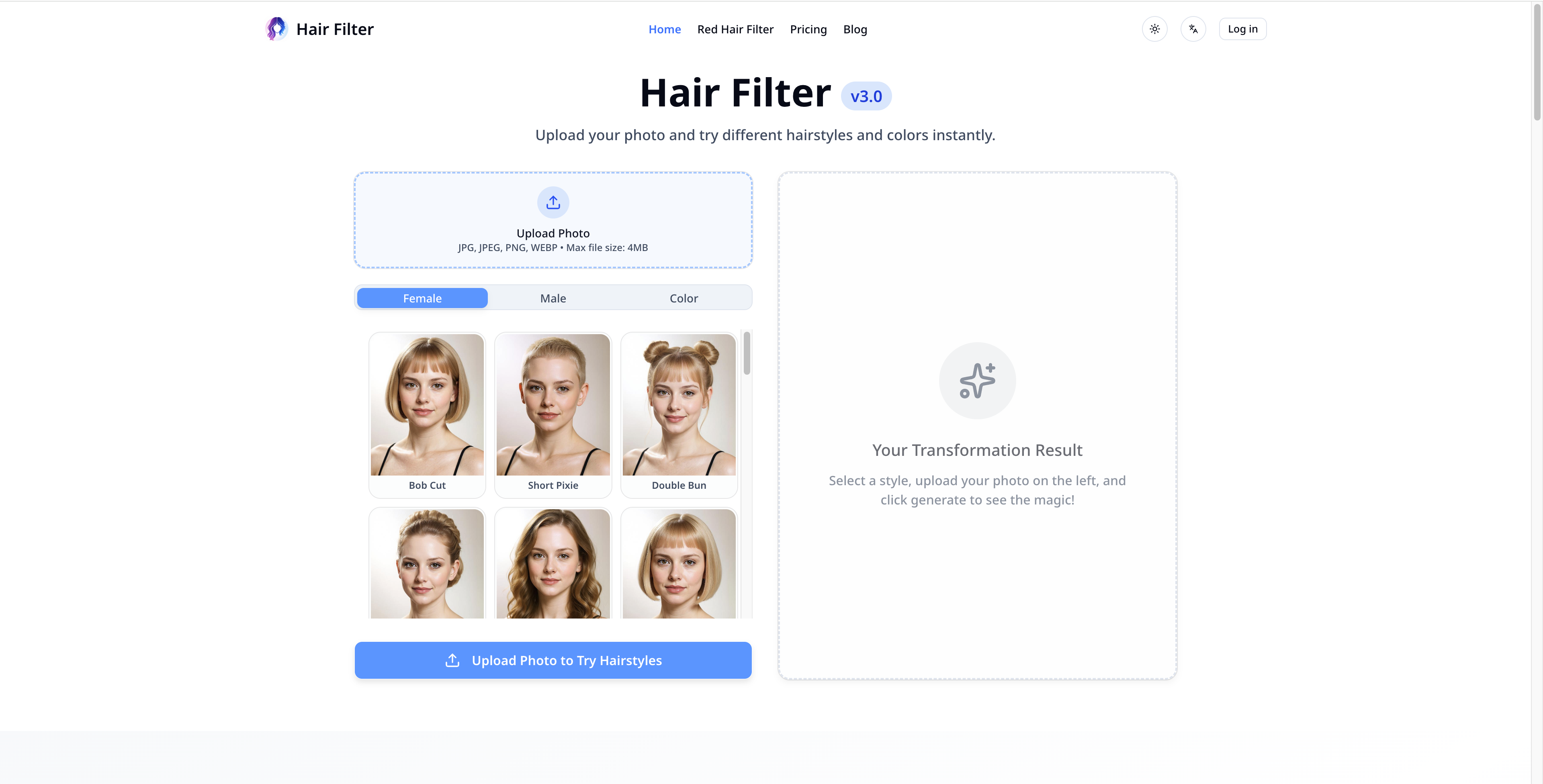
Hair Filter is a browser-based tool that lets you upload a photo and preview hairstyles and hair colors on your own face before making any real-world changes. You pick a style or color, the AI maps it onto your photo, and you get a reasonably realistic preview without booking an appointment or downloading anything. You can use it to narrow down options before a salon visit, or just to satisfy curiosity about whether you could pull off a pixie cut or platinum blonde. The tool runs entirely in the browser, so there's no account required to get started on the free tier. For hair stylists, it functions as a lightweight client consultation aid — show a client a few rendered options on their own photo rather than relying on stock images of someone else's hair.
- Upload a single photo and preview hairstyles mapped to your face in the browser.
- Change hair color across a range of shades without any software installation.
- Try multiple styles in one session to compare options side by side.
- Runs entirely in the browser — no app download or account required on the free tier.
- Freemium access lets you test the core functionality before paying.
What stands out
- No install required — works immediately from any browser.
- Useful for real decision-making before a salon visit, not just novelty.
- Free tier lets you evaluate output quality before committing to a paid plan.
- Practical for stylists as a low-friction client consultation tool.
Where it falls short
- AI hair overlays can look unrealistic on complex or curly hair textures.
- Free tier likely has usage limits or watermarked outputs — $9 paywall for full access.
- Results depend heavily on photo quality and lighting; poor inputs produce poor previews.
- Single-photo input means it won't account for how a style looks from different angles.
Who it's for
- People considering a haircut or color change who want to preview the result before committing real money at a salon.
- Beauty and lifestyle creators who need quick visual content showing style variations without a full photoshoot.
- Hair stylists and salon staff looking for a simple visual aid to help clients articulate what they actually want.
- Social media users experimenting with aesthetic changes for fun or for planning a transformation post.
Pricing
What we hold on record for Hair Filter.
- Pricing model
- Freemium
- Plan details
- 9
Advertised prices often assume annual billing — The Annual-Billing Illusion , our study of 150 tools.
Our take
Salon preview tool for the indecisive
— Toolhunter editors
Frequently asked questions
Is Hair Filter free?
There's a free tier. Paid upgrades are available.
What is Hair Filter used for?
Salon preview tool for the indecisive. It's listed under Developer Tools in our directory.
What are the best Hair Filter alternatives?
The closest matches in our directory are BankBridge, LaunchIntel, AI Token Cost Calculator (Tavi) and Launchy — see "More tools like this" below for the full set.
Keep comparing
Reviews
No reviews yet
Be the first to share your experience.
More tools like this
All Developer Tools tools →Looking for AI tools similar to Hair Filter? These are the closest picks in our index.

Let your AI agent answer questions about your real bank data. BankBridge is a hosted MCP server with read-only access to your bank accounts, transactions and holdings, for Claude, ChatGPT, Cursor and Gemini. $5/mo per connected bank, cancel any time.

LaunchIntel gives Claude Code or Codex curated, categorized directory playbooks, each tested end to end, to submit your product and track every step.

Estimate what Claude, GPT and Gemini cost a month for your job, with caching and batch pricing, across 11 models.

A weekly curated batch of handpicked product launches for makers and users to discover.

Local alternatives to the tools you already use

Free fullscreen light screen. No download.

Face recognition API that is a drop-in replacement for AWS Rekognition: index, search, compare and detect faces, billed per photo with no subscription.

Free online screen tests and troubleshooting guides. No downloads required.

A free perfume knowledge connector for AI assistants: 1,400+ designer and niche perfumes, 400+ raw materials and a family map, over MCP or REST. No key, no account.